Weather app - Radar & Widget
- 4.5
- Rating
- 10.00M
- Installs
- Free
- Price
 Analysis by App-foxy
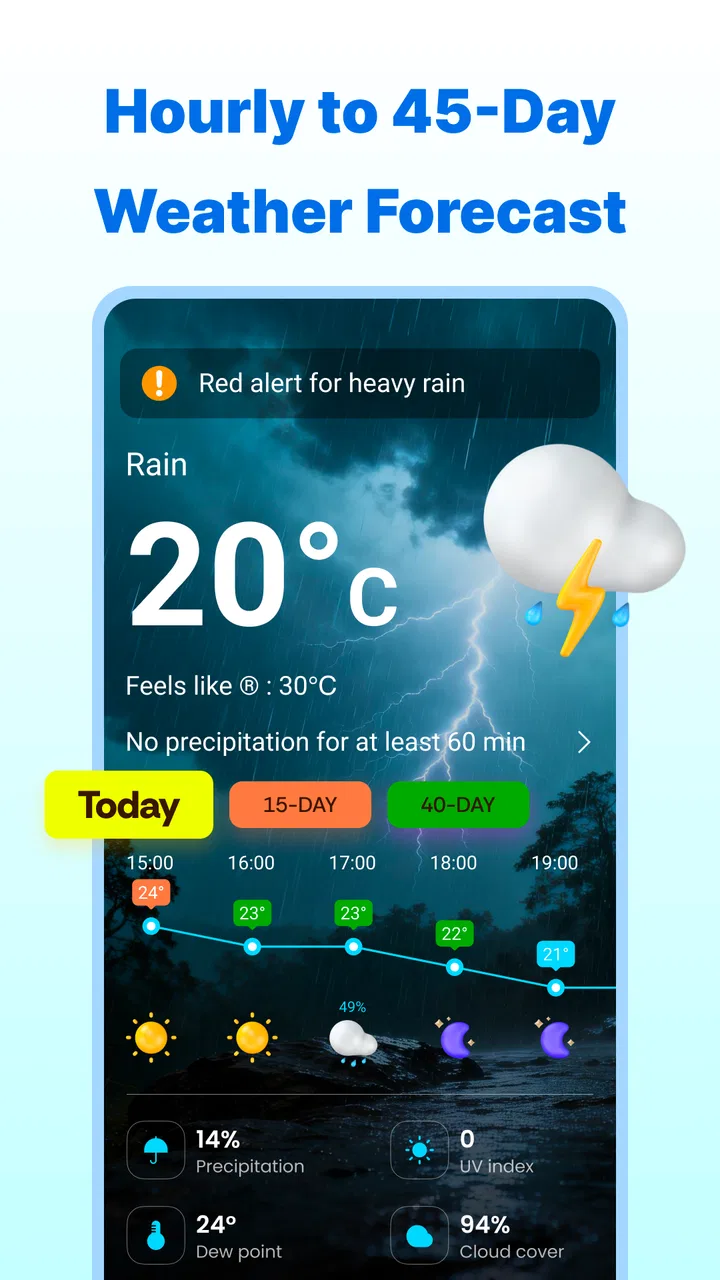
I installed Weather app - Radar & Widget from Fillog Studio because I wanted something more useful than a quick temperature glance. My usual problem is not knowing whether rain is actually moving toward me, when a shower is likely to arrive, or whether I should change plans before leaving home. This app is aimed at that exact gap: it combines local forecasts, radar-style storm tracking, and a home-screen widget in one weather tool.
My first impression was that it feels designed for repeated, practical checks rather than one long browsing session. I can look at the current conditions, move to the forecast, and then use the radar view when the sky looks uncertain. That sequence matters. A temperature alone rarely tells me whether a walk is sensible; a forecast paired with a visual view of approaching weather gives me a better basis for deciding.
It is a free Android weather app for everyone, and it works on devices running Android 6.0 or later. Fillog Studio released it on March 10, 2021, and the current version is 1.6.1. Its public reception is strong, with a 4.5 average from around 139 thousand ratings and more than 10 million installs. Those figures do not replace personal testing, but they do suggest that the app has found a broad audience.
You May Also Like

 Pandora - Music & Podcasts
Pandora’s Music Is Easy to Start, but Harder to Recover
Pandora’s strength is its low-effort path from a seed to a station. Its weak spot is how much confidence it asks you to place in connection, setup, and quiet recovery.

 8 Ball Pool
 Is Built on Rivalries, Rematches, and Routine
A close look at the rivalries, rematches, shared routines, and unanswered safety questions that turn a quick pool match into a persistent mobile community.

 Samsung Music
’s Quiet Strength Is Playing What You Already Own
Its reach comes less from spectacle than from dependable access to a personal library. That simplicity is both the app’s strongest retention engine and its ceiling.

 AccuWeather: Weather Radar
AccuWeather Review: A Quick, Clear Forecast for Everyday Decisions
For everyday plans, the best forecast is the one you can understand quickly. AccuWeather makes rain timing, radar, and local conditions easy to act on, with a few trade-offs.

 Hill Climb Racing
Why Hill Climb Racing Still Turns Crashes Into One More Run
A tiny car, a bumpy hill and one more upgrade: Hill Climb Racing keeps resurfacing because its simple chaos makes every near-miss feel personal.

 AliExpress - Shopping App
AliExpress Makes Global Shopping Feel Personal, but Shoppers Bear the Risk
AliExpress turns a global marketplace into a pocket-sized discovery engine. Its reach is useful, its shopping loop compelling, and its trade-offs easy to miss.
More From Our News Desk
View All News


From a quick weather check to a practical decision
I find that a weather app becomes more useful when it helps me turn a quick check into a decision everyone at home can act on. In this section, I look at how a shared glance at local conditions can shape plans without assuming that every person needs the same level of detail. That distinction matters most when the next question is how each person should use the app on a shared device.
Starting with the situation that actually matters
The most useful way to approach this app is to begin with a real question instead of opening it without a plan. If I am deciding whether to cycle, walk to a station, dry clothes outdoors, or leave a window open, I first need the current local picture. The app gives me a starting point for that check, then lets me move toward more detail when the simple answer is not enough.
That makes it different from relying only on the small weather panel built into a phone. A basic system widget is convenient, but it often encourages a single-number habit: temperature, perhaps with a small icon. Here, the weather widget is part of a wider workflow. I can use the glanceable information first and open the full app when timing, cloud movement, or storm development matters more than the headline condition.
I found this especially helpful on days when the forecast looks harmless but the sky is changing quickly. The local forecast provides the broad expectation, while the radar view helps me judge whether the weather nearby is moving in my direction. I would not treat a radar display as a guarantee, but it is a more useful second opinion than simply refreshing the temperature.
Building a routine around the widget
The widget is most valuable when I place it somewhere I already look, rather than treating it as a decorative extra. My practical routine is to check it before leaving, then open the app only if the displayed conditions raise a question. That reduces unnecessary tapping and keeps the detailed view for moments when it can change my decision.
A small but important trade-off is that widgets can become visual noise if I already have several home-screen panels competing for attention. I would recommend using it for one clear purpose: a fast local check. If I want a dense dashboard with many unrelated measurements always visible, this may feel less focused than a specialist weather station app. For ordinary planning, though, the widget creates a useful handoff from passive information to active investigation.
Another good habit is to compare the widget with the full forecast when the situation is time-sensitive. A widget is excellent for noticing that conditions have changed, but it is not the best place to make a detailed decision about a long outing. Opening the main interface gives the forecast and radar context that a compact home-screen element cannot provide.
Moving through the app step by step
My workflow usually follows four stages. I begin with the local conditions, move to the forecast to understand what is expected next, inspect the radar when precipitation or storms are the main concern, and then return to the practical question I started with. That final step is easy to overlook. Weather information is only useful when it leads to an action, such as carrying a jacket, postponing a trip, or choosing an indoor alternative.
The forecast is the broad planning layer. It helps answer whether the next part of the day looks stable or changeable. I use it for decisions that do not require minute-by-minute precision, such as choosing clothing, planning errands, or deciding whether an outdoor task is worth starting. The app is more useful here than a single current-condition card because it encourages me to consider the period ahead.
The radar and storm-tracking view is the investigative layer. When I see dark clouds or hear thunder, I want to know whether the problem is local, passing, or approaching. The visual movement gives me a way to interpret the situation instead of relying only on a generic rain symbol. This is one of the app’s stronger ideas, because it connects the forecast to what is visibly happening around me.
A non-obvious tip is to use the radar before making a short trip, not only during obvious storms. A brief shower can be enough to ruin a walk, while a larger weather system may still be far away. Checking the movement first can help me decide whether waiting ten minutes is sensible or whether I should change the plan entirely. It is a small workflow improvement, but it is more actionable than repeatedly checking the current temperature.
Handoffs between people, plans, and devices
Weather decisions are often shared. One person checks the forecast, another decides when to leave, and someone else may be responsible for children, pets, deliveries, or outdoor work. In that context, the app works best as a common reference rather than as an automatic decision-maker. I can check the forecast and radar, then pass on a simple conclusion: leave now, wait, take rain protection, or cancel the outdoor part of the plan.
The widget supports a second kind of handoff, from the phone itself to the rest of the day. Once the information is visible on the home screen, I do not need to open the app for every small check. That is convenient for busy mornings, but it also means I should remember that a widget is a snapshot, not a substitute for opening the detailed view when conditions are changing quickly.
For commuting, I would use it shortly before leaving and again if the journey is long enough for conditions to change. For a family outing, I would inspect the radar before everyone gets ready, because that can prevent a last-minute scramble. For outdoor work, I would treat the forecast as planning guidance and the radar as a near-term reality check. These are different handoffs, and the app’s combination of views suits all three better than a bare temperature widget.
What the result feels like in everyday use
The result is not that the app predicts every weather event perfectly. The real benefit is that it gives me a clearer path from uncertainty to a reasonable choice. I can start with a quick local glance, add forecast context, inspect storm movement, and finish with a decision that matches the situation. That is a sensible design for people who want more than a weather icon without needing a professional meteorology tool.
One realistic example is a weekend walk. Before leaving, I check the widget and notice that the conditions look unsettled. I open the forecast to see whether the change is temporary, then use the radar to check whether rain is moving toward the route. If the shower appears close, I can delay the start or choose a shorter path. If it is moving away, I may still go, while carrying suitable clothing. The app does not make the choice for me; it makes the choice easier to explain.
Another example is drying laundry. A forecast may suggest a generally acceptable afternoon, but a nearby shower can still make the plan risky. The radar view gives me a reason to keep checking the sky and to avoid leaving clothes outside during an uncertain window. This is a modest use case, yet it shows why the app is more practical than a simple daily forecast card.
For travel, I would use it as a local planning aid rather than as a complete journey system. It can help me understand the weather at the place I am preparing to leave from, but I would still consider conditions along the whole route through other means when the trip is long. That is an important boundary: the app is strongest for local, immediate decisions and less suited to replacing every travel-planning tool.
Where the workflow becomes less comfortable
The first limitation is the unavoidable uncertainty of weather information. A radar image can improve my understanding of nearby precipitation, but it cannot promise that every street will experience the same thing. Local geography, wind, and rapidly forming showers can make the visual picture less decisive than I would like. I see the radar as evidence, not an exact appointment calendar.
The second limitation is that the app may feel like more than some people need. If my only question is today’s temperature, the built-in phone weather display may be faster and simpler. This app earns its place when I use the forecast, radar, or widget together. Someone who wants the smallest possible interface may prefer a lighter alternative, while someone who wants highly technical atmospheric information may need a dedicated specialist service.
There is also a possible distraction in having several layers of information available. The widget invites quick checking, but the full app can encourage me to keep looking when the practical answer is already clear. I found it best to decide in advance what I am checking: current conditions, the next part of the day, or approaching precipitation. That prevents the radar from becoming an endless visual loop.
The free entry point is a clear advantage, although the app includes in-app purchases ranging from $4.99 to $16.99 per item. I would judge those options only after using the core experience long enough to know whether the extra value matters to me. For a casual user, paying may not be necessary. For someone who relies on the app frequently, the decision depends on which additional conveniences are offered in the version available on their device and whether they improve the specific workflow they use.
Battery and attention are also practical considerations for any weather widget. I would avoid placing several weather widgets on multiple home screens and would keep the setup focused. The app is most efficient when it reduces the number of times I need to search for weather information, not when it creates another stream of notifications or visual clutter. A clean placement makes a bigger difference than adding every available display option.
Who should install it, and who should skip it
I think this app is a good fit for people who regularly make short outdoor decisions and want forecast information plus a visual view of nearby weather. Walkers, commuters, parents organizing outings, cyclists, and anyone who checks conditions before errands can get real value from the widget-and-radar combination. It is also a sensible choice for Android users with older devices, since the minimum requirement is Android 6.0 or later.
I would skip it if I only want a single temperature reading and dislike opening detailed weather screens. I would also look elsewhere if I need advanced meteorological analysis, professional-grade observation tools, or a complete route forecast for long-distance travel. In those cases, a simpler system tool or a more specialized weather service may be a better match.
The age rating of Everyone makes it approachable for a broad household, and the free price makes trying it low-risk. Still, I would not install it simply because it has a large audience. Its value comes from a particular habit: glance first, investigate second, decide third. If that pattern matches the way I plan my day, the app feels purposeful. If not, it may become another unused icon.
My final assessment after following the full workflow
Weather app - Radar & Widget is at its best when I treat it as a decision tool rather than a decorative forecast screen. The widget handles the first glance, the forecast adds planning context, and the radar helps with uncertain or fast-changing conditions. That sequence gives the app a clear identity among ordinary weather apps.
I especially like the handoff from a passive home-screen check to an active radar investigation. It saves time on routine mornings while still giving me somewhere to go when the weather becomes difficult to read. The main caution is to keep expectations realistic: visual tracking improves judgement, but it does not remove uncertainty, and the app is not a replacement for specialist analysis.
With a 4.5 average and more than 10 million installs, it is clearly established, but my recommendation is based on the workflow itself. I would recommend trying the free version if you often ask, “Can I go out now, or should I wait?” Start with the widget, use the forecast for the broader plan, and open the radar only when timing or storm movement matters. Its strongest result is turning a vague weather worry into a concrete next step.
FAQs for Weather app - Radar & Widget
01What features does the Weather app - Radar & Widget offer?
The Weather app - Radar & Widget provides real-time weather updates, radar maps, and customizable widgets. Users can access hourly and 7-day forecasts, receive severe weather alerts, and view detailed information like humidity and wind speed. The app also offers interactive radar maps for tracking weather patterns.
02Is the Weather app - Radar & Widget free to use?
Yes, the basic version of the Weather app - Radar & Widget is free to download and use. However, it offers in-app purchases and a subscription model that unlocks premium features like ad-free usage, advanced radar options, and personalized weather notifications.
03How accurate are the weather forecasts in this app?
The Weather app - Radar & Widget utilizes data from multiple meteorological sources to provide accurate and up-to-date forecasts. While no weather app can guarantee 100% accuracy, this app is known for delivering reliable information and timely updates, thanks to its use of sophisticated algorithms and real-time data.
04Can I customize the widgets in the Weather app?
Yes, the Weather app - Radar & Widget allows for extensive customization of its widgets. Users can choose different widget sizes, themes, and display options to suit their preferences. You can customize what information is shown, such as temperature, forecast, and radar views, directly on your home screen.
05Does the app support multiple locations for weather tracking?
Absolutely, you can track weather conditions for multiple locations using the Weather app - Radar & Widget. This feature is particularly useful for travelers or those who wish to keep an eye on the weather at different places simultaneously. Simply add the desired locations, and you'll receive updates for each.
Pros
- Accurate real-time weather updates.
- Customizable widget options.
- User-friendly interface design.
- Detailed radar and satellite maps.
- Severe weather alerts.
Cons
- Occasional ads can be intrusive.
- Some features require a subscription.
- Battery consumption is slightly high.
- Map loading can be slow at times.
- Limited offline functionality.

Weather app - Radar & Widget
Gallery